
A driver app built for the truck cab
Today's pickups in sequence, one-tap navigation, photo + signature capture and weighbridge sync - all in a Progressive Web App that installs from a link and works when the signal drops. Dispatch sees the truck live; the supplier gets an ETA. Nobody calls anybody.
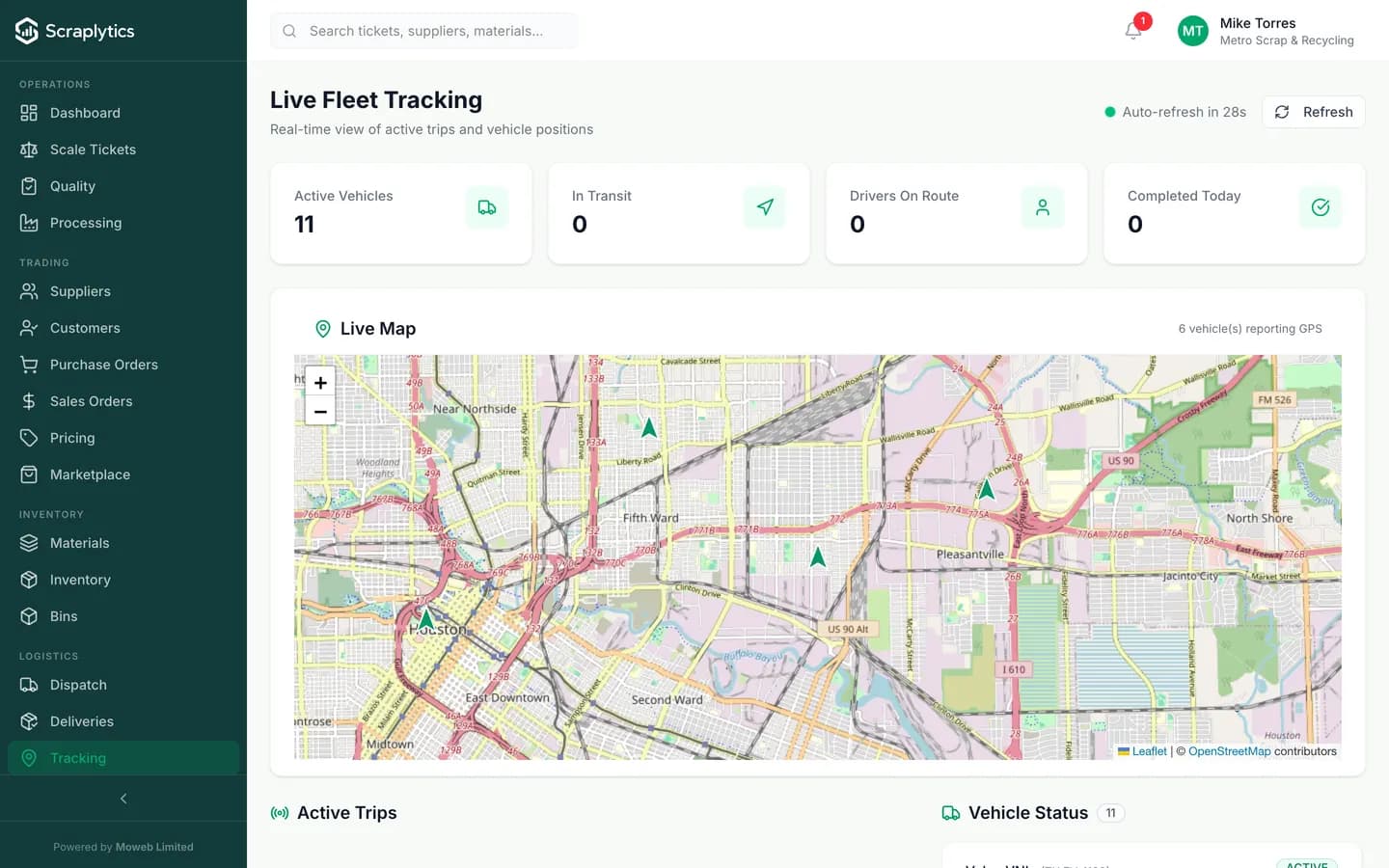
Dispatch sees the same trucks the drivers are riding - status, current pin, ETA, refresh every 30s.
Why the driver app changes the day
Most scrap yards still run dispatch over WhatsApp screenshots and paper slips. Here is what changes the day drivers open the app.
Drivers get the pickup list as a WhatsApp screenshot or a hand-written sheet. Half the addresses are wrong, two stops get missed, and dispatch finds out at 5pm.
Drivers open the app and see today's pickups in the order dispatch assigned, each with the supplier's name, exact GPS pin and any load notes. New jobs appear automatically with a push notification.
A driver swears the load was 2,400 kg. The supplier swears it was 2,800 kg. The weighbridge ticket is in the cab somewhere. Three days later you settle for the supplier's number and lose the margin.
The driver photographs the load, captures a tare/gross from the yard weighbridge and the supplier signs on glass before they pull out. The ticket is closed before the truck leaves the gate, with photo evidence attached.
A truck disappears for two hours between pickups. The dispatcher has no idea if there's traffic, a breakdown, or a coffee stop, and the next supplier is calling.
Every truck pins on the dispatch map with a status (en route, at pickup, loaded, returning) and a freshness timestamp. The supplier gets an auto-SMS with the truck's ETA - the dispatcher's phone stops ringing.
A driver's day on the app
Driver logs in
Driver opens the app on their phone or a cab-mounted tablet and signs in with their PIN. The day's assigned pickups appear in sequence with supplier names, addresses and load notes.
Navigate + capture
Tap a pickup to open its address in the maps app. On arrival the driver captures load photos, the supplier signs on glass and the gross/tare weight comes in from the yard weighbridge automatically.
Dispatch sees it live
Status updates flow back to the dispatch map in real time. Mark complete and the next pickup pops up. The office never wonders where the truck is and the supplier gets an ETA SMS.
Inside the driver experience
Built for one-handed use in the truck
Drivers do not have time to pinch, zoom or tab through forms. Every screen is touch-target sized for gloves, every action is a single tap, and the bottom-of-screen action bar moves the next button under the driver's thumb. New drivers are productive in ten minutes - no training session, no manual.
Proof-of-delivery that holds up in a dispute
On every pickup the driver captures: a wide front-of-load photo, the supplier's signature on glass, gross / tare / net weight from the connected weighbridge, and timestamped GPS. Each artifact attaches to the dispatch job and the scale ticket. When a customer claims short, you pull the ticket, see the photo and weight, and the conversation ends in 30 seconds.
Offline queueing for status updates
Coverage on the route to an industrial estate or a small-town yard is often spotty. The app caches the day's jobs and supplier details when the driver leaves the yard, lets them capture weights, photos and signatures with no connection, and syncs everything the moment a signal returns. Nothing is lost, nothing waits on the truck.
Live ETA back to the supplier
When a job is in transit, the supplier gets an automatic SMS / WhatsApp with a tracking link. They see the truck on a map and the live ETA. No more "what time is the truck coming" calls. For B2B suppliers this single change has cut inbound coordination calls by 60-80% at our pilot yards.
What ships with the driver app
Frequently asked questions
Is there a separate native app to download?+
The driver app runs as a Progressive Web App - drivers visit a link, log in with a PIN, and it adds to the home screen on iOS and Android. No app store install, no signed APK to distribute. Updates ship instantly to every truck the next time the app opens.
What devices does the driver app run on?+
Any iOS 14+ or Android 9+ device with a camera and GPS. Most yards either issue rugged Android tablets that live in the truck or let drivers use their personal phone. Both work the same. The cached job list and offline capture mean a momentary network drop never stops the workflow.
How does the weight get from the weighbridge to the app?+
Gross and tare are entered on the device at the weighbridge and the ticket calculates net, deductions and the payable total from there. Reading the weight automatically off the indicator is a per-site integration rather than something that works out of the box - ask us about your specific hardware.
Does the app work in remote yards with weak signal?+
Yes. The day's jobs, supplier details and weighbridge tare history are cached on device when the driver leaves the yard. Photos, signatures and status updates queue locally and sync the moment the phone gets back on a signal - on Wi-Fi at the destination yard, or anywhere in between.

Ready to modernize your scrap yard?
Start your 14-day free trial today and be writing digital tickets by tomorrow. No credit card, no contract.
- No credit card required
- 14-day free trial
- Cancel anytime