
Scrap Dispatch Software that runs the yard
Scrap dispatch software with route optimization, a driver mobile app, live GPS tracking and digital proof-of-delivery on every pickup. One dashboard for pickups, deliveries and yard transfers - your customers get real-time ETAs without you picking up the phone.
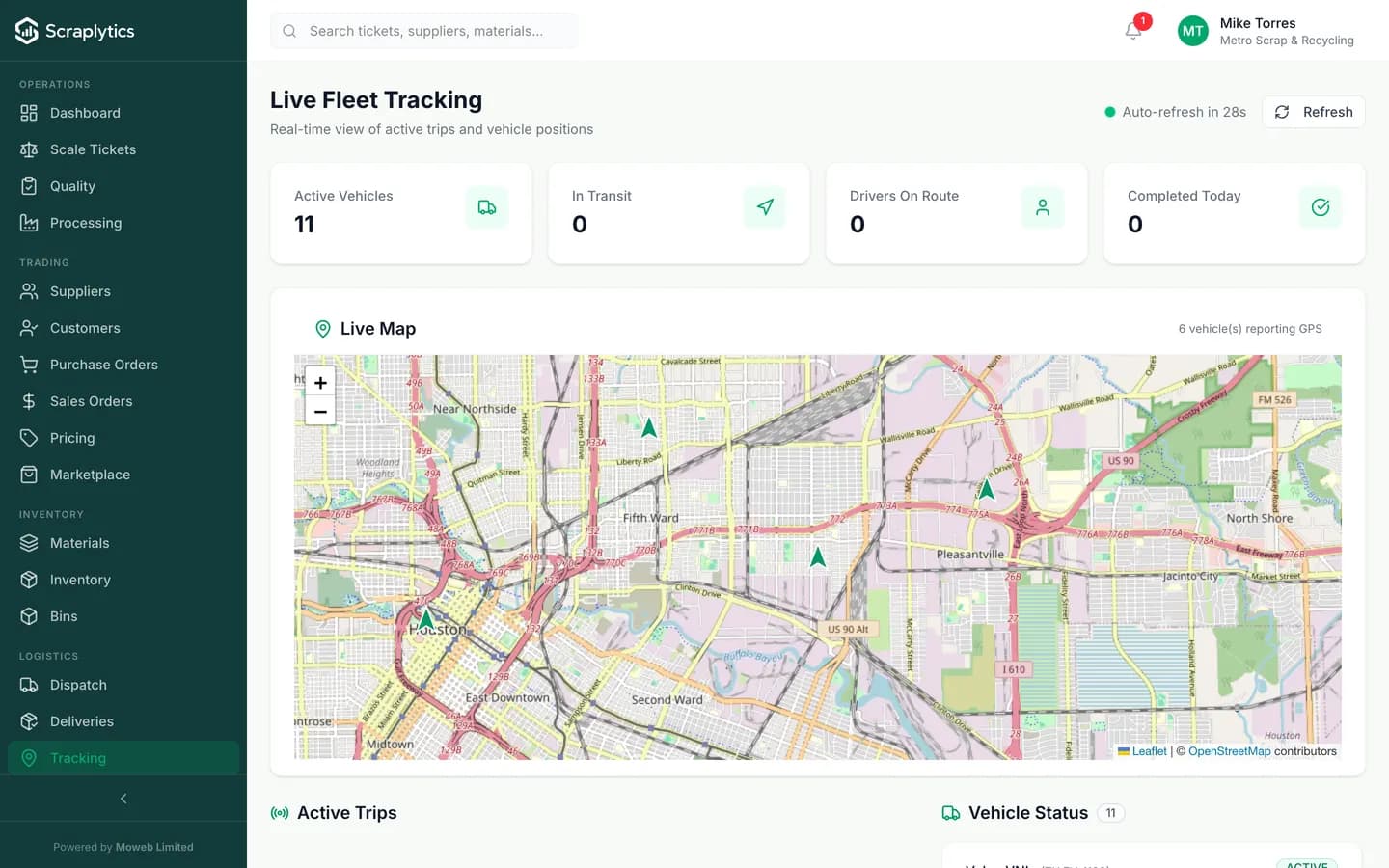
Live GPS positions, status, ETA - auto-refresh every 30 s.
Why scrap yards adopt dispatch software early
Scrap dispatch is not last-mile delivery. Loads are heavy, routes change mid-day, and a missed pickup costs a relationship. Here is what changes the day you switch.
Dispatch lives in a whiteboard, a clipboard and three phone calls. Drivers ask where to go next, customers ask where the truck is, and nobody has a single source of truth.
Every job, address and load is on one dispatch board. Drivers see their next stop in the app, customers get auto-SMS with the truck ETA. Phone calls drop to near zero.
Paper delivery slips get lost between the yard, the driver and accounting. Disputes drag for weeks because nobody has a photo of the load that left.
Drivers capture photo + signature on every pickup and drop. POD lands in the office instantly, attached to the ticket. Disputes settle in minutes, not weeks.
Trucks run half-empty or backtrack 40 miles because routes are planned by gut. Fuel bills are punishing, and you cannot tell if a route was profitable until the month closes.
The route engine sequences pickups to minimize miles and matches loads to truck capacity. Fuel cost per ton drops, and a per-route P&L tells you which lanes pay and which do not.
How dispatch flows in your yard
Build the day
Add pickups, deliveries and yard transfers to the board. Assign vehicles and drivers, or let the route engine sequence stops by distance and load capacity.
Push to drivers
Jobs sync to the driver mobile app with addresses, contact, load notes and a one-tap link that opens each pickup in the maps app. Status updates flow back live as drivers arrive, load and depart.
Close the loop
POD photos, signatures and load weights post against the ticket the moment the driver hits Complete. Accounting invoices the same day, no paper to chase.
Inside the dispatch engine
Route engine that respects real-world constraints
The engine sequences pickups and drops by drive distance, vehicle capacity, time windows and yard cut-off times. Roll trucks separately from flatbeds, lock a supplier into a morning slot, or weight a route to one driver who knows the territory. The optimizer accepts manual overrides, so the dispatcher always has the final call.
Proof-of-delivery that holds up in a dispute
Drivers capture front-of-load photos, gross/tare weights, signature on glass and timestamped GPS at pickup and drop. Each artifact is attached to the dispatch job and to the underlying scale ticket. When a customer claims a short load, you open the ticket, see the photo and weight, and the conversation is over in 30 seconds.
Live tracking the office can actually use
Every truck pins on a single map with status (en route, at pickup, loaded, at drop, returning), current ETA and last-update time. The board auto-refreshes every 30 seconds. Supervisors spot a stalled truck before the customer calls, and customer service can answer "where is my pickup" without paging the driver.
Full Fleet Management
Frequently asked questions
Do drivers need a smartphone or can they use a yard tablet?+
Either works. The driver app runs on any iOS 14+ or Android 9+ device. Most yards issue rugged Android tablets that live in the truck, but personal phones are fine. The app caches the day's jobs so coverage gaps in remote yards do not block the workflow.
Can the system handle roll-off, flatbed and pickup trucks together?+
Yes. Vehicles carry a type, capacity and trailer compatibility. The route engine respects those constraints when assigning jobs, so you do not get a roll-off scheduled for a pickup that needs a flatbed. Drivers see only the jobs assigned to their truck.
How accurate is the live GPS tracking?+
Position updates every 30 seconds when the driver app is open, and every 2-5 minutes in the background. Accuracy is typically within 10-20 meters in cities and 5-10 meters on highways. The map shows the last-known position with a freshness timestamp so dispatch always knows how stale the dot is.
Does dispatch connect to scale tickets and invoicing?+
Yes - dispatch is part of the same workflow. The POD weight from the driver becomes the gross/tare on the scale ticket, the ticket prices automatically, and the invoice or supplier payment is queued the moment the job is marked complete. No double entry.

Ready to modernize your scrap yard?
Start your 14-day free trial today and be writing digital tickets by tomorrow. No credit card, no contract.
- No credit card required
- 14-day free trial
- Cancel anytime