
Scrap Inventory Management Software that knows your yard
Scrap inventory management software with real-time stock by material, grade and bin location. Weighted-average cost, multi-yard rollups, and automatic updates from every scale ticket. Always know what you have, where it is, and what it's worth.
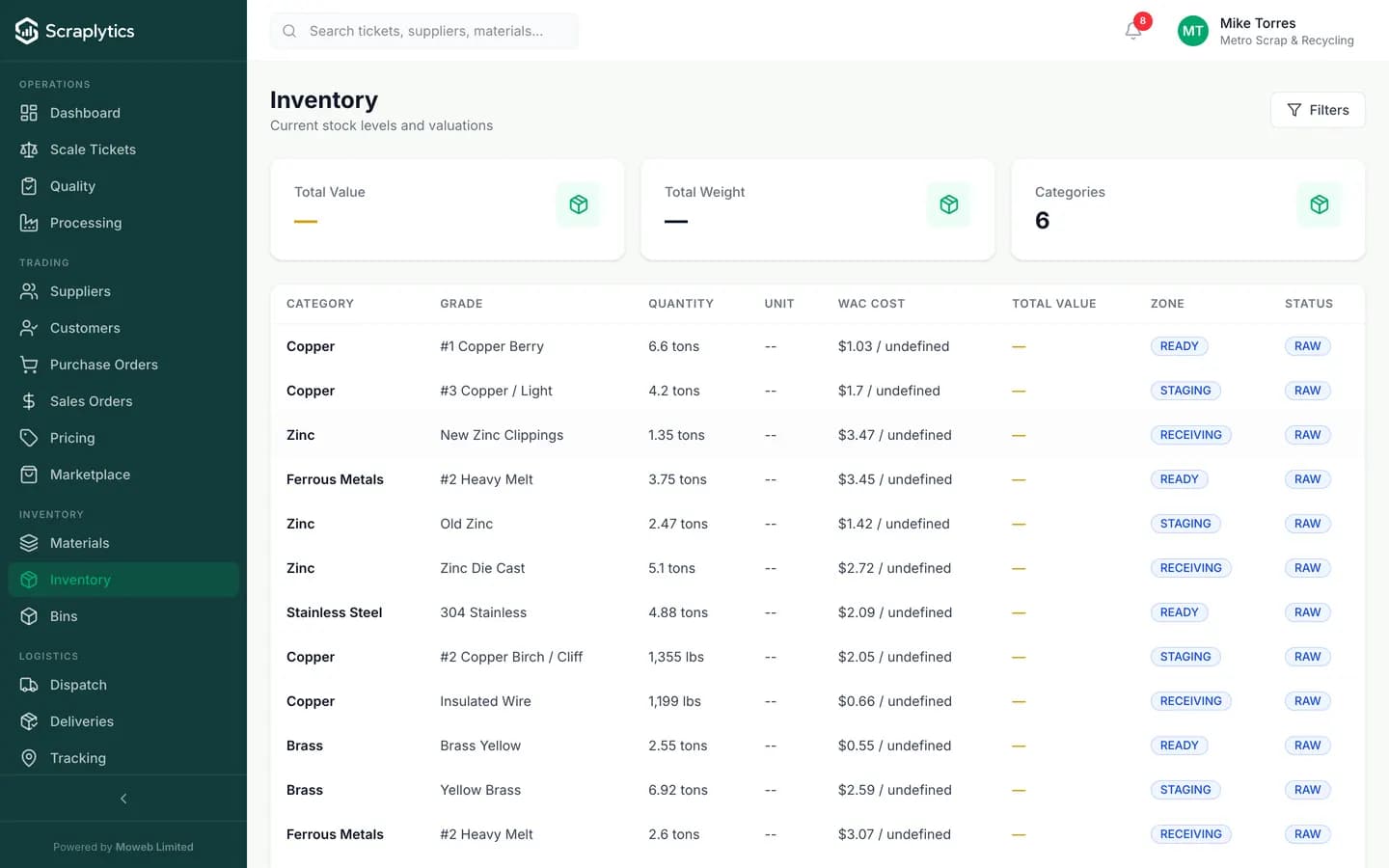
Per-material stock, WAC cost, zone and reservation status.
Why scrap yards choose this inventory management software
Generic inventory software was built for boxes on a shelf. Scrap inventory is heavy, graded, moves through yards, and costs you the moment it stops moving. Here is what changes when inventory becomes real.
Stock counts live in a clipboard, a manager's memory and three Excel sheets. Nobody knows the real on-hand tonnage of #2 copper at 9 a.m., so quoting is guesswork.
Every scale ticket and dispatch hits inventory in real time. Open the inventory screen and see exact on-hand by ISRI grade, by zone, by reserved-vs-available - down to the kilogram.
Material is in the yard somewhere. Pickers walk 200 meters, dig through three piles, and the truck is now late. Yard staff cost more than the margin on the load.
Every lot is bin-tagged with a QR code and a yard-map zone. Pickers see "Aluminum 6063, Zone C-12, 2.4 tons reserved for SO-1042" and walk straight to it.
You buy at one price, sell at another, but cost-of-goods is a yearly guess from your accountant. Margin per material is a black box, so you keep buying losers.
Weighted-average cost (WAC) updates on every purchase. Every sale posts gross margin against the WAC. The margin-by-material report shows the losers in the first 30 days.
How inventory moves in your yard
Scale ticket posts to stock
A purchase weighs in. The ticket prices, the supplier gets paid, and the material is added to inventory at that exact weight, grade and cost basis. No second entry.
Tag the lot and the zone
Print a QR label, stick it on the bin or bale. The lot now has a location, a grade, a weight and a cost. Yard staff scan to confirm, edit grade if needed, and move on.
Sale reserves and ships
A sales order reserves the right grade and weight. Dispatch picks the reserved lot, the load weighs out, and inventory deducts automatically. Margin posts against WAC.
Inside inventory management
Stock that respects grade, lot, location and reservation
Inventory is not a single quantity per material. Every lot has its own grade (ISRI #1, #2, mixed), source supplier, in-date, cost basis and physical zone. The system tracks "available" vs "reserved against open SOs" separately, so two operators selling the same material at the same time do not over-promise.
Weighted-average cost that auto-adjusts on every receipt
Each purchase recomputes the WAC for that material/grade combination. When a load sells, gross margin is calculated against the current WAC and posted to the P&L immediately. You see margin by material, by supplier, by salesperson - the levers that actually move the bottom line - without waiting for month-end.
Alerts and ageing so nothing sits and rots
Each grade has a configurable low-stock threshold and a max-age threshold. The dashboard surfaces "out-of-spec" lots: 90+ days on hand, below reorder point, contaminated and held, or reserved-but-not-shipped past the dispatch window. Stale material is the most expensive thing in a yard. It cannot hide.
Complete Inventory Control
Frequently asked questions
Does inventory update automatically from scale tickets?+
Yes. Every approved scale ticket adds to inventory at the captured weight, grade and cost. Every approved dispatch deducts. There is no separate "post to inventory" step - it is the same transaction.
How do you handle different ISRI grades of the same material?+
Each grade is a separate row in inventory. Copper #1, Copper #2, Copper bare bright and Copper insulated wire are tracked, costed and priced independently. Reports roll them up by parent material when useful.
Can I track inventory across multiple yards or warehouses?+
Yes. Yards, warehouses and bonded storage are first-class locations. Each lot lives at one location, transfers are auditable, and consolidated views show totals across locations or filtered to one.
What costing method do you use - FIFO or weighted average?+
Weighted-average cost (WAC) is the default and recomputes on every purchase. FIFO and per-lot specific costing are available for tenants that need them for tax or audit reasons - configurable per company.

Ready to modernize your scrap yard?
Start your 14-day free trial today and be writing digital tickets by tomorrow. No credit card, no contract.
- No credit card required
- 14-day free trial
- Cancel anytime